
WeatherXM vs. Tempest: The Ultimate Weather Mining Guide (2026 Comparison)

Let’s be honest for a second.
Most of us treat our backyards like a money pit. We pour cash into fertilizer, lawnmowers, and fancy solar lights that break after three weeks, and what do we get in return? A few tomatoes and a sunburn.
It’s time to make your garden pay rent.
Welcome to Weather Mining—the easiest entry point into the DePIN (Decentralized Physical Infrastructure) revolution. While big corporations are building billion-dollar radar networks, the real opportunity for regular people is hyper-local data.
By sticking a small white gadget on your fence, you can collect weather data, send it to the blockchain, and get paid in cryptocurrency every single morning.
But which device is the real deal? The crypto-native WeatherXM or the sleek tech-favorite WeatherFlow Tempest?
I’ve tested both. Here is the no-nonsense breakdown for 2026.
What is Weather Mining? How to Earn Crypto from Your Backyard
First, let’s cut through the jargon. Why would anyone pay you for knowing it’s raining at your house?
Because the weather app on your phone is lying to you.
Most weather apps pull data from the nearest airport, which could be 20 miles away. That airport doesn’t know about the micro-climate in your cul-de-sac. But farmers, AI trading algorithms, and insurance companies need to know. They need to know if a hailstorm hit your specific block or if it missed you by a mile.
This is DePIN. Instead of building one giant radar tower, the network pays thousands of people to be mini-weather stations. You provide the data; they provide the crypto.
WeatherXM Review 2026: Features, $WXM Rewards, and ROI
The Pitch: “The station built by crypto people, for crypto people.”
WeatherXM is the heavyweight champion of this niche. It was designed from day one to be a miner. You buy the station, you connect it to your WiFi (or the Helium network), and it drops $WXM tokens into your wallet daily.
WeatherXM Hardware Specs: WiFi vs. Helium Version
- WiFi Version ($400): This is the “Suburban” choice. It connects directly to your home router. It’s cheaper and easier to set up, but it needs to be within range of your house.
- Helium Version ($400+): This is the “Rural” choice. It uses LoRaWAN connectivity (via the Helium network). Perfect for a farm, a cabin, or a large property where WiFi doesn’t reach.
Earnings Potential: How Much $WXM Can You Make Daily?
- Mechanism: Proof of Location (PoL). The station checks its GPS coordinates daily to prove it exists.
- Quality Score: You get a daily “QoD” (Quality of Data) score. As long as you don’t install it indoors or under a tree, you get 100% of the rewards.
- Payout: Paid daily in $WXM tokens on the Arbitrum One network (low gas fees).
⚠️ The Downside
Moving Parts break. The WeatherXM is a traditional mechanical station. It has spinning plastic wind cups. In a severe hurricane, those cups can snap off. Also, the rain bucket can get clogged with leaves, which stops your earnings until you climb up a ladder and clean it.
WeatherFlow Tempest Review: The Best Smart Home Weather Station?
The Pitch: “The Tesla of weather stations.”
The Tempest is a masterpiece of engineering. It looks like a sleek white teardrop. It has zero moving parts. No wind cups to break, no rain funnel to clog. It is honestly space-age tech.
Tempest Technology: Haptic Sensors vs. Traditional Wind Cups
How does it measure wind without spinning cups? Physics.
- Ultrasonic Anemometer: It shoots invisible sound waves between two sensors. The wind speeds up or slows down the sound waves, and the computer calculates the wind speed instantly.
- Haptic Rain Sensor: This is the coolest part. The top of the device is a vibration sensor. It “feels” the impact of raindrops. It can distinguish between a light drizzle and a heavy storm just by the vibration signature.
Can You Mine Crypto with a Tempest Station? (Beta Support)
Technically, yes—but there is a catch.
While Tempest is not a native crypto device, WeatherXM has opened a Beta Program for third-party devices.
- The “Guest” Status: You can connect your Tempest to the WeatherXM network, but you are effectively a “guest.”
- Lower Rewards: Native WeatherXM stations generally receive priority rewards. Third-party devices like the Tempest are often part of a separate, smaller reward pool.
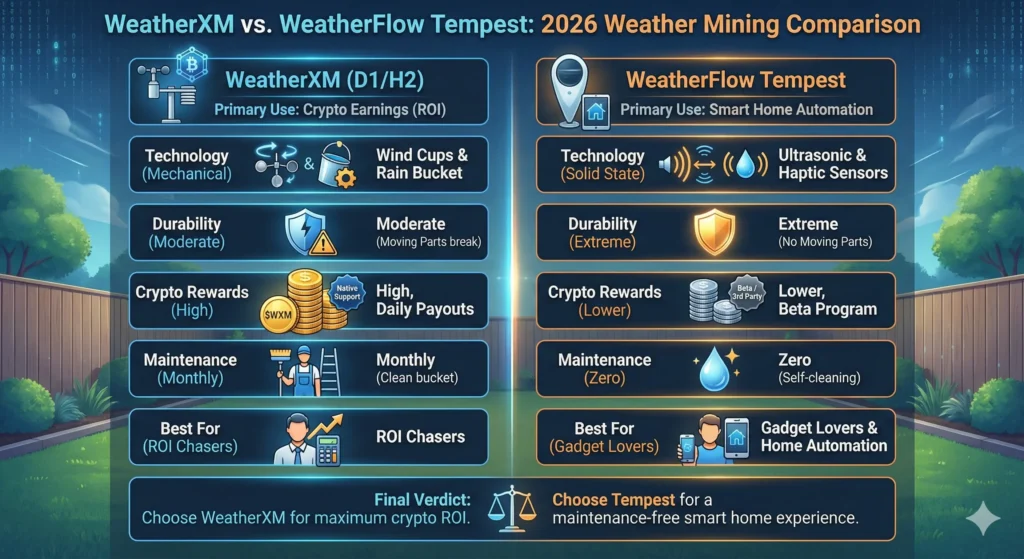
Comparison Chart: WeatherXM vs. Tempest (Speed, Accuracy & Profit)
| Feature | WeatherXM (D1/H2) | WeatherFlow Tempest |
|---|---|---|
| Primary Use | Crypto Earnings (ROI) | Smart Home Automation |
| Technology | Mechanical (Cups/Bucket) | Solid State (Ultrasonic) |
| Durability | Moderate (Plastic parts) | Extreme (No moving parts) |
| Crypto Rewards | High (Native Hardware) | Lower (Beta/Third-Party) |
| Maintenance | Monthly (Clean the bucket) | Zero (Self-cleaning) |
| Best For | ROI Chasers | Gadget Lovers |
How to Maximize Your Weather Station Earnings
Buying the device is only Step 1. If you install it wrong, your data is trash, and the network will ban you.
1. The “Goldilocks” Height
Don’t nail it to the side of your house. The heat from your brick wall will mess up the temperature readings.
- The Rule: Mount it at least 6-8 feet above the ground on a standalone pole.
2. Avoid the “Heat Islands”
Do not put it next to your AC unit, dryer vent, or dark asphalt driveway. The network algorithms are smart—if they see your backyard is 100°